
ArchiVerif
Find What You Forgot to Back Up
You regularly back up your data, but aren't sure whether specific files were ever copied? ArchiVerif compares everything to identify precisely what you forgot to back up!
Absolute Certainty That Your Backups Are Complete
ArchiVerif compares the contents of two directories to identify files that lack an identical copy in the reference backup. The comparison utilizes cryptographic SHA-256 hashing: a file is recognized even if its name or folder path differs.
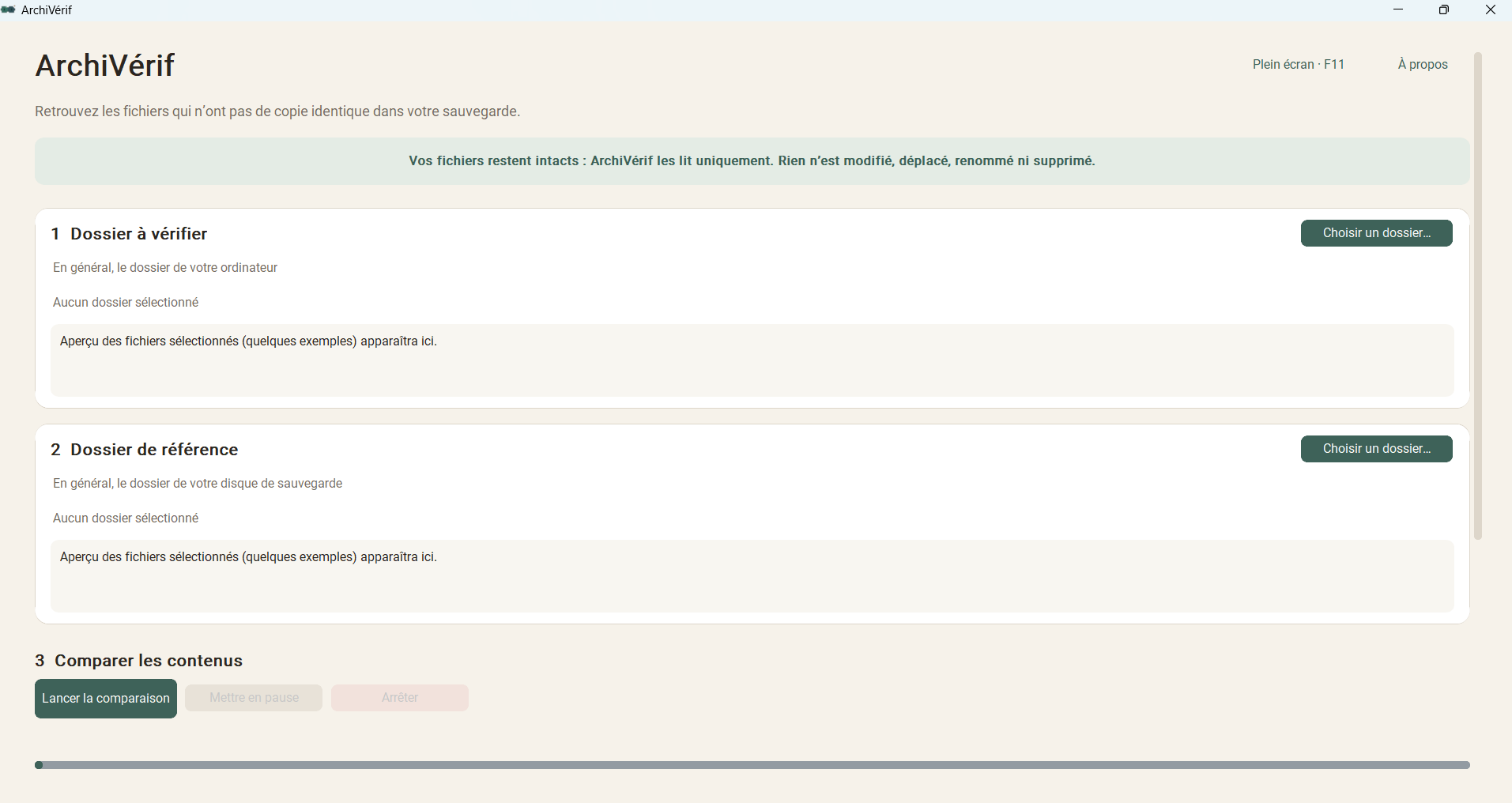
The application reads your selected folders strictly in read-only mode, without ever modifying, moving, renaming, or deleting files. You can pause, resume, or abort the scan at any time, and export findings to a text report or copy them to your clipboard.
Recover Forgotten Files Without Risk
Over the years, photos, home videos, and work files get scattered across multiple computers, external hard drives, and USB sticks. When organizing your archives, uncertainty creeps in: has this folder been backed up? Does this file already exist on the backup drive?
Mirror sync tools frequently impose complex rules with the constant danger of accidentally overwriting data. ArchiVerif follows a passive safety philosophy: it inspects your folders with precision without ever writing, highlighting missing items so you can archive with total peace of mind.
Auditing Holiday Photos & Video Backups
Plug in your external drive after a trip: ArchiVerif sifts through your directories and provides the exact list of shots that haven't been copied to your backup drive yet.
Upgrading Workstations or Disk Migration
Before decommissioning an old PC or reinstalling your operating system, verify your directories against your backup disk to ensure no vital documents are lost.
Reorganised Folders & Renamed Files
Moved a directory or renamed files? Using SHA-256 binary hash matching, ArchiVerif recognises the exact copy even if its path or filename has changed.
Passive Safety and Total File Integrity
ArchiVerif was engineered to deliver total peace of mind during your data verification workflows:
- • Your files remain strictly untouched: ArchiVerif operates in read-only mode. Nothing is ever altered, moved, renamed, or deleted.
- • 100% offline & zero telemetry: no network transfers, no account required, your files and privacy stay entirely on your local machine.
- • Official certified distribution: freely available for Windows 10 & 11 via the Microsoft Store (MSIX package) and as a standalone portable build.
Core Features
SHA-256 Block-by-Block 4MB Fingerprinting
4MB block-level digital hashing enabling rapid scanning of gigabytes of data and large files without memory saturation.
Path & Filename Independent Matching
Binary content is authoritative: even if a file was moved to a subfolder or renamed, ArchiVerif matches it as backed up, preventing false missing reports.
Read-Only Guarantee & Zero Loss Risk
Absolute passive safety: the application executes zero disk write actions, completely eliminating any risk of accidental overwrite or deletion.
Real-Time Control: Pause, Resume & Stop
Interrupt or resume scans at any moment via dedicated controls, with smooth progress bars and live file-processing status.
Text File (.txt) Export & Clipboard Copy
Review detailed breakdown (missing files, total size, unreadable items skipped) and export the list in one click to the clipboard or as a .txt report.